
Latest Articles

Read developer perspectives, tech tips, system optimization workflows, and digital design guides written by our engineers.

UI/UX Designer Salary in India 2026: Complete Guide
admin Jun 01, 2026

UI/UX Designer Salary in India 2026: Complete Guide

Introduction The digital revolution has made UI/UX designer salary in India one of the most sought-after topics among aspiring designers and career switchers. With India’s booming tech industry and increasing focus on user experience, understanding the current salary landscape is crucial for making informed career decisions. This comprehensive guide covers everything you need to know about UI/UX designer salaries in India, from entry-level positions to senior roles, helping you navigate this lucrative career path. UI/UX Designer Salary in India: Current Market Overview The average UI/UX designer salary in India currently stands at ₹6.3-7.5 lakhs per annum according to the latest industry data. However, this figure varies significantly based on experience, location, and company type. For UI/UX designer salary for freshers in India, entry-level professionals typically earn between ₹2.5-4 lakhs annually. Meanwhile, experienced designers with 5+ years of experience can command salaries ranging from ₹10-25 lakhs or more. The salary range breakdown shows: Entry-level (0-2 years): ₹2.5-6 lakhs per year Mid-level (3-5 years): ₹7-12 lakhs per year Senior-level (5+ years): ₹10-25+ lakhs per year Experience-Based UI/UX Designer Salary in India Fresher UI/UX Designer Salary UI/UX designer salary for freshers in India typically starts at ₹2.5-4 lakhs annually. According to recent data, the monthly starting salary ranges from ₹35,000 to ₹40,000. Mid-Level Professional Salaries Professionals with 3-5 years of experience see substantial growth, with salaries ranging from ₹7.4-9.5 lakhs annually. This represents a significant 40-60% increase from entry-level positions. Senior Designer Compensation Senior UI/UX designers with 5+ years of experience earn between ₹10-17.5 lakhs annually, with top professionals commanding salaries exceeding ₹20 lakhs. Location-Wise UI/UX Designer Salary in India Geographic location significantly impacts UI/UX designer salaries in India. Here’s a breakdown of major cities: City Average Annual Salary Bangalore/Bengaluru ₹7.9 lakhs / ₹2.4L-15L Mumbai ₹6.6 lakhs / ₹2L-12.5L New Delhi ₹7 lakhs / ₹2.1L-12L Pune ₹6.8 lakhs / ₹1.9L-12L Hyderabad ₹6.5 lakhs / ₹2L-11.5L Chennai ₹6.6 lakhs / ₹1.9L-10.5L Bangalore and Mumbai typically offer the highest salaries due to their status as major tech hubs, while tier-2 cities offer competitive packages with lower living costs. Top Companies and UI/UX Designer Salaries IT Services Companies Tata Consultancy Services: ₹4-9 lakhs/year Infosys: ₹3-10 lakhs/year Wipro: ₹2.2-12.3 lakhs/year Accenture: ₹4-10 lakhs/year Product Companies Jio: ₹5-14 lakhs/year Zoho: ₹4-9 lakhs/year Specialized Design Studios Lollypop UI/UX Studio: ₹5-8 lakhs/year Factors Affecting UI/UX Designer Salary in India 1. Experience and Skills Your technical proficiency directly impacts earning potential. Key skills that boost salaries include: Design Tools: Figma, Sketch, Adobe Creative Suite Prototyping: Wireframing and interactive prototypes User Research: Understanding user behavior and needs Basic Coding: HTML, CSS knowledge increasingly valuable 2. Educational Background Candidates from premier institutions like IITs, NITs, or specialized design schools often command higher starting salaries. 3. Industry Specialization Certain sectors offer premium compensation: Fintech and Banking: Higher salaries due to complex user needs E-commerce: Competitive packages in growth-focused companies Healthcare Tech: Specialized knowledge commands premium rates 4. Company Size and Stage Startups: Lower base but potential equity upside Mid-size Companies: Balanced compensation with growth opportunities Large Corporations: Highest base salaries with comprehensive benefits Freelance vs Full-Time: UI/UX Designer Earnings Full-Time Employment Full-time positions offer stability with the average UI/UX designer salary ranging from ₹6-8 lakhs annually. Benefits include: Steady monthly income Health insurance and benefits Career advancement opportunities Professional development support Freelance Opportunities Freelancing can potentially offer higher hourly rates, with experienced freelancers earning ₹2,000-5,000 per hour or more. Many freelancers report earning above the standard UI/UX designer salary in India through consistent client relationships. Skills That Boost UI/UX Designer Salary in India Technical Skills Design Systems: Creating scalable design frameworks User Research: Conducting usability studies and user interviews Information Architecture: Organizing content logically Accessibility Design: Creating inclusive user experiences Emerging Technologies Voice UI Design: Designing for voice interfaces AR/VR Design: Virtual and augmented reality experiences AI/ML Integration: Designing AI-powered interfaces Tips to Increase Your UI/UX Designer Salary 1. Build a Strong Portfolio Showcase diverse projects with clear problem-solving processes and measurable results. Include case studies demonstrating your impact on business metrics. 2. Continuous Learning Stay updated with industry trends by: Attending design conferences and workshops Completing relevant certifications Learning new tools and methodologies 3. Network Actively Build professional relationships through: Design community participation Local meetup attendance LinkedIn engagement Design challenge participation 4. Strategic Negotiation Research market rates and present data-backed salary expectations. Consider the complete compensation package, not just base salary. 5. Specialize in High-Demand Areas Focus on emerging fields like: UX research and strategy Design systems architecture Conversion rate optimization Accessibility consulting UI/UX Designer Salary Trends 2026 The UI/UX designer salary in India continues to grow as companies recognize design’s business value. Key trends include: Increased demand for user-centered design across industries Higher premiums for specialized skills and domain expertise Remote work opportunities expanding salary potential beyond location constraints Growing startup ecosystem creating more high-paying opportunities Future Outlook for UI/UX Designers in India With India’s digital transformation accelerating, the demand for skilled UI/UX designers remains strong. The average UI/UX designer salary is expected to continue growing, especially for professionals who stay updated with emerging technologies and user needs. Why Choose Arrayno Software for Your UI/UX Career Journey? At Arrayno Software, we believe great design is at the heart of every successful digital product. As businesses increasingly prioritize user experience, skilled UI/UX designers are becoming some of the most valuable professionals in the tech industry. Whether you're a beginner looking to start your design career or an experienced designer aiming to enhance your skills, Arrayno Software encourages continuous learning, innovation, and user-centered design practices that help professionals thrive in today’s competitive market. Conclusion The UI/UX designer salary landscape in India offers excellent opportunities for both newcomers and experienced professionals. While fresher salaries may start at ₹2.5-4 lakhs, dedicated professionals can achieve substantial growth, with senior designers earning ₹15-25+ lakhs annually. Success in maximizing your UI/UX designer salary comes from combining strong design skills with business understanding, continuous learning, and strategic career moves. Whether you’re just starting or looking to advance your career, the Indian UI/UX market offers tremendous potential for those committed to creating exceptional user experiences. At Arrayno Software, we believe that investing in UI/UX skills today can open doors to rewarding career opportunities tomorrow. FAQ Is UI/UX design a high-paying career in India? Yes, UI/UX design is considered a high-paying career in India, with average salaries of ₹6-8 lakhs annually and significant growth potential for experienced professionals. What is the starting salary for UI/UX designers in India? The starting UI/UX designer salary for freshers in India ranges from ₹2.5-4 lakhs annually, with monthly salaries typically between ₹35,000-40,000. Which cities offer the highest UI/UX designer salaries in India? Bangalore, Mumbai, and Delhi typically offer the highest salaries, ranging from ₹7-8 lakhs annually for average positions. Do UI/UX designers need coding skills for higher salaries? While not mandatory, basic HTML/CSS knowledge is increasingly valuable and can boost salary potential. What’s the salary difference between UI and UX designers in India? UX designers typically earn slightly more than UI designers due to the strategic and research aspects of the role, with UX researchers earning around ₹9 lakhs annually.

Read Full Article

The Complete DevOps Roadmap 2025: A Comprehensive Guide for Modern Software Development
admin Jun 01, 2026

The Complete DevOps Roadmap 2025: A Comprehensive Guide for Modern Software Development

Introduction In today’s rapidly evolving technology landscape, DevOps has become the cornerstone of modern software development and deployment. At Arrayno Software, we understand that mastering the DevOps roadmap is crucial for organizations seeking to accelerate their software delivery while maintaining high quality and reliability. This comprehensive DevOps learning path will guide you through every essential aspect of DevOps, from fundamental concepts to advanced implementation strategies. Whether you’re a beginner starting your DevOps journey or an experienced professional looking to enhance your skills, this roadmap provides the structured approach you need. What is DevOps and Why Does It Matter? DevOps is a cultural and technical movement that bridges the gap between development and operations teams. It emphasizes collaboration, automation, and continuous improvement throughout the software development lifecycle. The DevOps roadmap we’ll explore helps organizations achieve several key benefits: Faster Time-to-Market:** Accelerated software delivery cycles. Improved Quality:** Automated testing and continuous integration. Enhanced Collaboration:** Breaking down silos between teams. Increased Reliability:** Robust monitoring and incident response. Cost Optimization:** Efficient resource utilization and automation. Phase 1: Foundation – Building Your DevOps Knowledge Base 1.1 Understanding Core Concepts Before diving into DevOps tools, it’s essential to grasp fundamental concepts: * Continuous Integration (CI): Automated code integration and testing. * Continuous Deployment (CD): Automated application deployment. * Infrastructure as Code (IaC): Managing infrastructure through code. * Microservices Architecture: Decomposing applications into smaller services. * Containerization: Packaging applications with their dependencies. ### 1.2 Essential Programming and Scripting Skills A solid DevOps learning path requires proficiency in: * Python: For automation scripts and tool integration. * Bash/Shell Scripting: System administration and automation. * YAML/JSON: Configuration file formats. * SQL: Database management and queries. * Git: Version control fundamentals. ## Phase 2: Core DevOps Tools and Technologies ### 2.1 Version Control Systems Git remains the industry standard for version control. Therefore, mastering these DevOps skills is crucial: * Git workflows (GitFlow, GitHub Flow) * Branching strategies * Merge conflict resolution * Pull request processes * Repository management 2.2 Containerization and Orchestration Docker and Kubernetes are fundamental DevOps tools. Specifically, you should focus on: Docker Essentials: * Container creation and management * Dockerfile optimization * Docker Compose for multi-container applications * Container registries and image management Kubernetes Mastery: * Pod, Service, and Deployment concepts * ConfigMaps and Secrets management * Ingress controllers and networking * Helm charts for package management * Cluster monitoring and troubleshooting 2.3 CI/CD Pipeline Tools Implementing robust CI/CD pipelines is central to any DevOps roadmap. Consider these popular platforms and best practices: Popular CI/CD Platforms: * Jenkins: Open-source automation server * GitLab CI/CD: Integrated DevOps platform * GitHub Actions: Native GitHub automation * Azure DevOps: Microsoft’s comprehensive DevOps suite * CircleCI: Cloud-based CI/CD platform Pipeline Best Practices: * Automated testing integration * Parallel job execution * Artifact management * Environment promotion strategies * Rollback mechanisms Phase 3: Infrastructure and Cloud Technologies 3.1 Cloud Platforms Modern DevOps best practices necessitate cloud expertise across major providers: Amazon Web Services (AWS): * EC2, S3, RDS, Lambda * CloudFormation for IaC * AWS CodePipeline and CodeBuild * EKS for Kubernetes management Microsoft Azure: * Virtual Machines, Storage, SQL Database * Azure Resource Manager templates * Azure DevOps Services * AKS for container orchestration Google Cloud Platform (GCP): * Compute Engine, Cloud Storage, Cloud SQL * Cloud Deployment Manager * Cloud Build and Cloud Deploy * GKE for Kubernetes workloads 3.2 Infrastructure as Code (IaC) These are essential DevOps tools for infrastructure management: * Terraform: Multi-cloud infrastructure provisioning * Ansible: Configuration management and automation * CloudFormation: AWS-specific infrastructure templates * Pulumi: Modern IaC with familiar programming languages Phase 4: Monitoring and Observability 4.1 Monitoring Stack Comprehensive monitoring is crucial for DevOps best practices. This involves: Application Monitoring: * Prometheus: Metrics collection and alerting * Grafana: Visualization and dashboards * New Relic: Application performance monitoring * Datadog: Full-stack observability platform #### Log Management: * ELK Stack (Elasticsearch, Logstash, Kibana) * Fluentd: Log collection and forwarding * Splunk: Enterprise log analysis * CloudWatch: AWS native monitoring 4.2 Alerting and Incident Response Develop robust DevOps skills in these areas: * Alert threshold configuration * Escalation procedures * On-call rotation management * Post-incident reviews and improvements * SLA/SLO definition and tracking Phase 5: Security and Compliance (DevSecOps) 5.1 Security Integration A modern DevOps roadmap must include security. Key aspects include: * Static Application Security Testing (SAST) * Dynamic Application Security Testing (DAST) * Container security scanning * Secrets management (HashiCorp Vault, AWS Secrets Manager) * Compliance automation (SOC 2, GDPR, HIPAA) 5.2 Security Tools Essential security DevOps tools include: * SonarQube: Code quality and security analysis * OWASP ZAP: Web application security testing * Twistlock/Prisma: Container security platform * Snyk: Vulnerability scanning for dependencies Phase 6: Advanced DevOps Practices 6.1 Site Reliability Engineering (SRE) Advanced DevOps best practices encompass: * Error budgets and SLI/SLO management * Chaos engineering principles * Capacity planning and performance optimization * Disaster recovery and business continuity 6.2 GitOps and Progressive Delivery Cutting-edge DevOps skills in this area include: * ArgoCD: GitOps continuous delivery * Flux: Kubernetes GitOps operator * Canary deployments: Gradual feature rollouts * Blue-green deployments: Zero-downtime releases * Feature flags: Dynamic feature management Learning Resources and Certification Path Recommended Certifications Validate your DevOps learning path with industry certifications: * AWS Certified DevOps Engineer * Microsoft Azure DevOps Engineer Expert * Google Cloud Professional DevOps Engineer * Docker Certified Associate * Certified Kubernetes Administrator (CKA) Hands-on Practice Platforms Gain practical experience with platforms such as: * AWS Free Tier: Hands-on cloud experience * Katacoda: Interactive learning scenarios * Play with Docker: Container experimentation * GitHub: Open-source project contributions * Local lab environments: VirtualBox/VMware setups Implementation Strategy at Arrayno Software At Arrayno Software, we recommend a phased approach to implementing your DevOps roadmap: Phase 1: Assessment and Planning (Weeks 1-2) * Current state analysis * Skill gap identification * Tool evaluation and selection * Team training plan development Phase 2: Foundation Building (Weeks 3-8) * Version control standardization * Basic CI/CD pipeline implementation * Containerization adoption * Monitoring setup Phase 3: Advanced Implementation (Weeks 9-16) * Infrastructure as Code deployment * Security integration * Advanced monitoring and alerting * Performance optimization Phase 4: Optimization and Scaling (Weeks 17-24) * Process refinement * Advanced deployment strategies * Team skill enhancement * Continuous improvement implementation Measuring Success: Key DevOps Metrics Track your DevOps transformation progress with these metrics: Deployment Metrics * Deployment frequency: How often code is deployed * Lead time: Time from code commit to production * Mean time to recovery (MTTR): Recovery time from failures * Change failure rate: Percentage of deployments causing issues Quality Metrics * Code coverage: Percentage of code tested * Defect density: Bugs per lines of code * Customer satisfaction: User experience metrics * System availability: Uptime and reliability measures Common Challenges and Solutions Challenge 1: Cultural Resistance **Solution:** Implement gradual change management, provide comprehensive training, and demonstrate quick wins to build momentum. Challenge 2: Tool Integration Complexity **Solution:** Start with core DevOps tools, ensure proper documentation, and invest in automation to reduce manual overhead. Challenge 3: Security Concerns **Solution:** Integrate security from the beginning (DevSecOps), implement automated security scanning, and establish clear security policies. Future Trends in DevOps Stay ahead with emerging DevOps best practices: * AI/ML Integration: Intelligent automation and predictive analytics * Serverless Computing: Function-as-a-Service adoption * Edge Computing: Distributed application deployment * Quantum Computing: Next-generation computational capabilities * Sustainable DevOps: Green computing and environmental considerations Conclusion The DevOps roadmap outlined in this guide provides a comprehensive framework for transforming your software development and deployment processes. At Arrayno Software, we believe that successful DevOps implementation requires commitment, continuous learning, and adaptation to emerging technologies. Remember that your DevOps learning path is a journey, not a destination. The landscape continues to evolve, and staying current with DevOps tools, DevOps skills, and DevOps best practices is essential for long-term success. Start your DevOps transformation today by assessing your current capabilities, identifying priority areas for improvement, and implementing the practices outlined in this DevOps roadmap. With dedication and the right approach, you’ll build a robust, scalable, and efficient software delivery pipeline that drives business success.

Read Full Article
Website Cost in India: The Definitive 2026 Pricing Guide
admin Jun 01, 2026

Website Cost in India: The Definitive 2026 Pricing Guide

A website isn’t an off-the-shelf product with a fixed price tag. It’s a custom-built engine for your business’s growth. Asking for its cost is like asking for the price of a car—are you looking for a basic hatchback to get from A to B, or a luxury SUV with a powerful engine, custom interiors, and advanced safety features? Both are cars, but their value and cost are worlds apart. As a digital agency in Jaipur that builds websites for businesses across India every day, we believe in 100% transparency. In this definitive 2026 guide, we’ll break down every factor that goes into website pricing. We’ll give you real-world price ranges and expose the hidden costs others won’t mention, so you can budget effectively and make a smart investment in your digital future. Don’t Have Time? The Quick Answer (2026 Price Cheat Sheet) For those in a hurry, here’s a quick overview of what you can expect to invest in 2026. Website Type Ideal For Estimated Price Range (INR) Basic Informational Website Startups, freelancers, small local businesses ₹20,000 – ₹60,000 Lead-Generating Business Website SMEs, service providers, corporations ₹60,000 – ₹1,50,000 E-commerce Store Online stores, D2C brands, retail businesses ₹80,000 – ₹5,00,000+ Custom Web Application Tech startups, large enterprises, SaaS ₹5,00,000+ (Starts from) Disclaimer: These are estimated ranges. The final cost depends entirely on the seven key factors we discuss below. Let’s Build the Perfect Website for Your Budget Get a Free Quote Why Website Pricing Isn’t Simple (The Car Analogy) Imagine you walk into a car showroom and ask, “How much for a car?” The salesperson will immediately ask you questions: “What kind of car? What features do you need? What will you use it for?” A website is the same. A simple, 5-page “digital brochure” is like a Maruti Alto—reliable and gets the job done. A dynamic business website with a blog and lead generation tools is like a Hyundai Creta—more powerful, more features, better experience. An e-commerce platform with thousands of products and custom rules is like a Mercedes-Benz—a high-performance machine built for a specific, demanding purpose. The price is a reflection of the complexity, craftsmanship, and technology under the hood. The 7 Core Factors That Determine Your Final Cost The price ranges above are wide because of these seven crucial elements. Understand them, and you’ll understand your quote. 1. Design & UX: Template vs. Semi-Custom vs. Fully Custom Design This is about first impressions. A visually appealing and easy-to-use site builds trust. Template-Based (Low Cost): Using a pre-built design. It’s fast and affordable but can look generic. Semi-Custom (Mid-Range): Adapting a premium template to match your brand’s colors, fonts, and layout. A good balance of cost and personalization. Fully Custom UI/UX (High Cost): Designing the website from a blank canvas. This involves extensive research, wireframing, and prototyping to create a unique, high-impact experience that is proven to increase user engagement and conversions. 2. Platform & Technology: WordPress vs. Shopify vs. Custom Code The “engine” of your website. WordPress: The world’s most popular Content Management System (CMS). It’s powerful, flexible, and user-friendly, making it perfect for most business websites. Shopify/WooCommerce: The go-to platforms for e-commerce. They come with built-in tools for selling products online. Custom Code (React, etc.): For web applications and unique platforms that need specialized functionality, developers use powerful frameworks. This is the most expensive and time-consuming option. 3. Number of Pages & Complexity More pages and complex layouts mean more design and development time. A simple 5-page brochure site (Home, About, Services, Blog, Contact) will cost significantly less than a 50-page corporate site with multiple service pages, case studies, team bios, and location pages. 4. E-commerce Functionality Do you need to sell online? This adds a whole new layer of complexity. Features like payment gateway integration (Razorpay, Stripe), product management, inventory tracking, shipping calculators, tax rules, and customer accounts all add to the development cost. 5. Custom Features: The “Special Powers” This is where the price can vary the most. Do you need any special functionality? A booking and appointment system for a clinic or salon? A real-time price calculator for a service? A secure login portal for members or clients? Multi-language support to reach a wider audience? Integration with third-party software like your CRM or accounting system? 6. Content Creation: Do you have your own content? A beautiful website with poor content is like a supercar with no fuel. Will you provide all the text, images, and videos? Or do you need your agency to provide professional copywriting, corporate photography, and graphic design? High-quality content is critical for success and is often budgeted separately. 7. SEO-Readiness A cheap website is useless if no one on Google can find it. A professionally built website includes foundational Search Engine Optimization (SEO) from day one. This means clean code, a mobile-first design, fast loading speeds, and proper use of technical elements (like schema markup). This adds to the initial cost but saves you thousands in marketing fees down the line. Detailed Price Breakdown by Website Type (with Feature Lists) Let’s dive deeper into what you get for your investment. 1. The Basic Informational Website (Your Digital Business Card) Who it’s for: Startups, freelancers, and small businesses that need a professional online presence to build credibility and showcase their services. Key Features: 5-10 pages, mobile-responsive design, contact form, social media links, basic on-page SEO. Estimated Cost: ₹20,000 – ₹60,000 2. The Lead-Generating Business Website (WordPress) Who it’s for: Most Small and Medium-sized Enterprises (SMEs), service providers, and established businesses that want to actively generate leads and manage their own content. Key Features: Everything in a basic site, plus a blog/news section, newsletter integration, a user-friendly CMS (WordPress), and a more polished, brand-aligned design. Estimated Cost: ₹60,000 – ₹1,50,000 3. The E-commerce Store (Shopify & WooCommerce) Who it’s for: Any business wanting to sell products directly to consumers online, from small D2C brands to large retailers. Key Features: Secure payment gateway, product catalogs, shopping cart and checkout, user accounts, inventory management, and order management system. Estimated Cost: ₹80,000 – ₹5,00,000+. A simple store is on the lower end; a store with thousands of products and custom features will be on the higher end. 4. The Custom Web Application (SaaS/Portal) Who it’s for: Tech startups building a Software-as-a-Service (SaaS) product, or large enterprises needing a unique internal platform or customer portal. Key Features: Unique functionality built from scratch, complex databases, user dashboards, advanced security protocols, and third-party API integrations. Estimated Cost: Starts at ₹5,00,000 and can go into crores depending on complexity. Who Should Build Your Website? (Cost vs. Quality) 1. DIY Builders (Wix/Squarespace) Pros: Very low initial cost, easy to get started. Cons: Limited customization, poor for SEO, non-professional domain names (e.g., yourname.wix.com), and you have to do all the work yourself. Not recommended for serious businesses. 2. Hiring a Freelancer Pros: More affordable than an agency, direct communication. Cons: Can be a gamble on quality and reliability. A single person may lack expertise across all areas (design, development, SEO, content). There’s a risk of them disappearing or being unavailable for future support. 3. Hiring a Digital Agency (like Arrayno Softwares) Pros: A team of specialists (designers, developers, SEO experts, project managers), streamlined process, high-quality output, and long-term support and accountability. Cons: Higher initial investment than a freelancer. Warning: The Hidden & Ongoing Costs No One Talks About A professional agency will always be upfront about these ongoing costs. Domain Name: Your website’s address (e.g., yourbusiness.com). (Approx. ₹800 – ₹2,000/year) Web Hosting: The server space where your site’s files are stored. (Approx. ₹4,000 – ₹15,000/year for good shared hosting) SSL Certificate: The padlock that secures your site (HTTPS). Often included with hosting, but can cost extra. Crucial: Website Maintenance & AMC: This is non-negotiable for security. It covers software updates, security scans, backups, and support. (Approx. ₹15,000 – ₹60,000/year) Premium Plugins & Licenses: Some functionalities require paid plugins that have annual fees. Digital Marketing & SEO: Building the website is step one. Driving traffic to it requires an ongoing investment in SEO, content marketing, or ads. Your Website Is an Investment, Not an Expense A cheap website that is slow, looks unprofessional, or can’t be found on Google is not a deal—it’s a liability. It actively drives potential customers away and damages your brand’s credibility. Investing in a well-built, professionally designed website is an investment in your 24/7 marketing engine. It works for you while you sleep, generating leads, building trust with your audience, and establishing you as a leader in your industry. It’s the foundation of your entire digital presence. Frequently Asked Questions (FAQ) 1. How much does a 5-page website cost in India? A simple, professionally designed 5-page informational website typically costs between ₹25,000 and ₹50,000. This includes a mobile-friendly design, a contact form, and foundational SEO. 2. What is the monthly cost of running a website in India? While most core costs are annual, you can break them down. Expect a monthly running cost of ₹1,500 to ₹5,000 for a standard business website, covering hosting, maintenance, and essential licenses. This does not include marketing costs. 3. How much does a WordPress website really cost? The cost varies with complexity. A basic WordPress site using a customized theme can be ₹30,000 – ₹70,000. A custom-developed WordPress site with unique features will cost ₹70,000 – ₹2,00,000+. 4. Why are some developers so cheap? (Red Flags to Watch For) Extremely low prices (e.g., ₹5,000 – ₹10,000 for a website) are a major red flag. This often means they are using pirated themes/plugins (a huge security risk), have no understanding of SEO or user experience, and will offer zero support after the project is “complete.” Get a Transparent, No-Obligation Quote for Your Project Ready to build a website that delivers real results and a powerful ROI? The first step is a clear, honest conversation about your business goals. At Arrayno Softwares, we provide transparent quotes tailored to your specific needs. No hidden fees, no confusing jargon. Just a clear path to a successful website.

Read Full Article
How to Optimize Website Performance for SEO and UX
admin Jun 01, 2026

How to Optimize Website Performance for SEO and UX

In the modern digital world, website speed is no longer a “nice to have”—it’s a make-or-break element that has a direct impact on search rankings and user experience. Slow websites irritate users, raise bounce rates, and send Google’s algorithmic systems the wrong signals. Fast websites, on the other hand, provide smooth interactions, boost conversions, and get search engines on your side. In this complete step-by-step guide, we’ll delve into actionable techniques to enhance your website for better UX and better SEO, leveraging best practices followed by Arrayno Softwares for its customers. 1. Why Website Performance is Important Search engine rankings Page speed and Core Web Vitals are ranking signals for Google. Websites that are quicker rank better, receive increased organic traffic, and attract users’ attention. User experience (UX) A one-second page delay can cut conversions as high as 7%. People expect quick responses, and slow pages erode credibility, causing visitors to bounce from your site. Mobile-First Index With Google’s mobile-first indexing, smartphone performance is most important. Smartphone users typically browse using slow networks, which makes speed optimization even more vital. 2. Assess your existing performance Before making changes, you need baseline metrics: Google PageSpeed Insights Supplies data from field and laboratory, determines opportunities and diagnosis. Lighthouse (within Chrome DevTools) Provides comprehensive audits for performance, accessibility, search engine optimization, and best practices. WebPageTest Lets you conduct tests on load times across different network conditions and devices. Core Web Vitals Report (Search Console) Monitors real-world metrics: Largest Contentful Paint (LCP), First Input Delay (FID), and Cumulative Layout Shift (CLS). Run every tool, document scores, and prioritize the top three bottlenecks you have to overcome. 3. Optimize Images and Media They routinely make up the largest percentage of page weight. Reduce this by: Select the Correct Format Photograph for JPEG PNG for Images With Transparency SVG for logos and icons WebP or AVIF for next-generation compression Compress without losing quality Use plugins like ImageOptim, Squoosh, or imagemin-webpack-plugin (build-time plugins) Serve Responsive Images <img src="hero-800.jpg" srcset="hero-400.jpg 400w, hero-800.jpg 800w, hero-1200.jpg 1200w" sizes="(max-width: 600px) 400px, 800px" alt="Beautiful landscape" loading="lazy" /> srcset and sizes make the browser download the correct-sized image. loading="lazy" loads offscreen images only when they come into view. Use CSS Sprites or icon fonts for small graphical decorations to cut down on HTTP requests. 4. Utilize Browser Caching and CDN Browser Caching 5. Minify and Bundle Resources Minification CSS & JavaScript Remove whitespace, comment, and shortened variable names using Terser or cssnano. HTML Remove redundant attributes and whitespace using plugins such as html-minifier. Code Splitting and Bundling Bundle JavaScript code into manageable pieces using Webpack, Rollup, or Parcel. Code Splitting loads only the code for the page currently being viewed, which speeds up initial page loads. 6. Optimize Critical Rendering Path Inline Critical CSS 7. Enhance Server Response Time A slow Time to First Byte (TTFB) slows down overall system performance. VPS, managed Node.js hosting, or containerized platforms. Turn on GZIP or Brotli Compression gzip on; gzip_types text/plain text/css application/json application/javascript text/xml application/xml application/xml+rss text/javascript; Improve Database Queries Cache query outcomes, implement indexing, and apply connection pooling. Implement server-side caching For instance, utilize Redis or in-memory caches for high-frequency accessed data. 8. Ongoing Monitoring and Continuous Improvement Implement Real User Monitoring (RUM) Tools such as New Relic or Google Analytics’ Site Speed reports monitor real-world loads. Automate Performance Alerts Optimize your CI/CD workflow by incorporating Lighthouse CI into it to avoid regression. Regular Audits Hold regular quarterly or monthly review sessions to detect new problems as your site changes. Developer illustration Create responsive, SEO-optimized websites perfectly tailored to your brand. Contact Experts Now! Conclusion Web optimization is a comprehensive task that involves asset optimization, server optimization, frontend best practices, and ongoing monitoring. By implementing the strategies mentioned above, you’ll both enhance your SEO rankings due to quick page loads and better Core Web Vitals and provide a smooth user experience that engages users and turns them into customers. We at Arrayno Softwares focus on end-to-end website optimization, and we make it a point to see every digital project reach its full performance potential. Looking to speed your website’s performance? Contact us today!

Read Full Article
The Ultimate Technical SEO Checklist for Superior Performance
admin Jun 01, 2026

The Ultimate Technical SEO Checklist for Superior Performance

In today's competitive digital landscape, creating a website is only the beginning. To achieve higher search engine rankings and provide exceptional user experiences, businesses must focus on technical optimization. A well-structured Technical SEO Checklist ensures that your website is easy for search engines to crawl, fast for users to access, and optimized for long-term performance. Technical SEO goes beyond content creation and backlink building. It focuses on improving your website's infrastructure, including page speed, site architecture, mobile usability, crawlability, indexability, and server performance. When implemented correctly, technical SEO helps search engines understand your website more efficiently while improving overall user satisfaction. At Arrayno Software, we understand that a technically optimized website serves as the foundation for successful SEO campaigns. This guide will walk you through a comprehensive Technical SEO Checklist designed to improve website performance, boost rankings, and support sustainable online growth. Technical SEO Checklist: Step-by-Step Guide for Better Page Speed & Performance Technical SEO Audit A Technical SEO Audit helps identify hidden issues that may negatively impact your website's visibility and performance. Conducting regular audits ensures that your website remains optimized for both users and search engines. 1. Run a Core Web Vitals Assessment Core Web Vitals are among Google's most important ranking factors and directly influence user experience. The three primary metrics include: Largest Contentful Paint (LCP) Measures how quickly the main content loads. Recommended Score: Under 2.5 seconds First Input Delay (FID) Measures website responsiveness when users interact with a page. Recommended Score: Under 100 milliseconds Cumulative Layout Shift (CLS) Measures visual stability and unexpected layout movements. Recommended Score: Below 0.1 Tools such as Google PageSpeed Insights and Lighthouse can help evaluate these metrics and identify opportunities for improvement. 2. Minify CSS, JavaScript, and HTML Large code files can significantly slow down website performance. Minification removes: Unnecessary spaces Comments Line breaks Redundant code Benefits include: Faster loading speeds Improved user experience Reduced bandwidth usage Better search engine performance Code optimization should be a key component of every Technical SEO Audit. 3. Enable Browser Caching and Compression Browser caching allows returning visitors to load pages more quickly by storing static resources locally. Additionally, enabling: GZIP Compression Brotli Compression reduces file sizes before transmission. Benefits include: Faster page loading Reduced server load Better Core Web Vitals scores Improved SEO performance This step alone can reduce loading times significantly and improve overall website efficiency. 4. Optimize Images and Media Images are often among the largest elements on a webpage. To improve performance: Use modern formats such as WebP. Compress image files. Add descriptive alt text. Implement lazy loading. Use responsive image sizing. Proper image optimization improves both technical SEO and user experience. 5. Review Server Response Times Your hosting environment directly affects website performance. A healthy website should maintain: Time To First Byte (TTFB) Recommended: Under 200 milliseconds Ways to improve server performance: Choose reliable hosting providers. Optimize database queries. Use caching mechanisms. Implement a Content Delivery Network (CDN). Fast server response times contribute to stronger search engine rankings and improved user engagement. 6. Eliminate Render-Blocking Resources Certain CSS and JavaScript files can delay page rendering. Best practices include: Deferring non-critical JavaScript. Loading scripts asynchronously. Reducing unused CSS. Prioritizing critical resources. Removing render-blocking resources helps pages load faster and improves Core Web Vitals scores. 7. Implement Structured Data Structured data helps search engines better understand website content. Schema Markup can enhance search results through: Rich snippets Product ratings FAQs Reviews Events Business information Benefits include: Improved visibility Higher click-through rates Better search engine understanding Structured data is a crucial component of advanced Technical SEO optimization. Things to Consider Before Optimizing Page Speed & Performance Before making technical improvements, businesses should evaluate their website infrastructure and long-term requirements. 1. Assess Your Hosting Environment Your hosting solution should support current and future traffic demands. Hosting options include: Shared Hosting VPS Hosting Dedicated Servers Cloud Hosting Businesses experiencing growth often benefit from scalable cloud-based solutions. 2. Plan for Scalability As traffic increases, your website must continue performing efficiently. Consider: Load balancing Cloud infrastructure Server scalability Database optimization Planning ahead prevents future performance bottlenecks. 3. Audit Third-Party Scripts Many websites rely on third-party tools such as: Analytics platforms Chat widgets Advertising scripts Social media integrations Too many external scripts can negatively affect page speed. Regularly review and remove unnecessary third-party resources. 4. Define Performance Budgets Performance budgets establish limits for: Page size JavaScript usage Image weight Loading times This helps development teams maintain performance standards as websites evolve. 5. Establish Monitoring and Alert Systems Continuous monitoring helps identify issues before they affect users. Recommended monitoring areas: Uptime tracking Core Web Vitals Server performance Crawl errors Security issues Proactive monitoring ensures long-term website health and performance. Why Technical SEO Matters Technical SEO provides the foundation for all other SEO efforts. Benefits include: Faster website loading speeds Better user experience Improved search engine rankings Increased crawl efficiency Higher conversion rates Better mobile usability Stronger website security Without technical optimization, even high-quality content and strong backlink profiles may struggle to achieve their full ranking potential. At Arrayno Software, we help businesses create technically optimized websites that meet modern SEO standards and deliver exceptional user experiences. Conclusion A well-executed Technical SEO Checklist is essential for maintaining a fast, secure, and search-engine-friendly website. From improving Core Web Vitals and optimizing server performance to implementing structured data and monitoring website health, every aspect of technical SEO contributes to better rankings and improved user experiences. Regular Technical SEO Audits help identify issues before they impact performance, while detailed Technical SEO Reports provide actionable insights for continuous improvement. At Arrayno Software, we combine technical expertise with modern SEO strategies to help businesses build strong digital foundations that support long-term growth. By following this comprehensive Technical SEO Checklist, organizations can improve website performance, increase visibility, and create a seamless experience for both users and search engines. Frequently Asked Questions (FAQs) Q1. What Is Technical SEO? Technical SEO involves optimizing a website's infrastructure, code, server configuration, and performance to improve crawlability, indexability, user experience, and search engine rankings. Q2. Why Is Technical SEO Important? Technical SEO helps eliminate issues such as slow loading speeds, crawl errors, poor mobile usability, and indexing problems that can negatively impact search rankings and conversions. Q3. What Is Included in a Technical SEO Audit? A comprehensive Technical SEO Audit typically evaluates: Core Web Vitals Website architecture Crawlability Indexability Mobile responsiveness Structured data Page speed Internal linking Security issues Q4. What Are Core Web Vitals in Technical SEO? Core Web Vitals are Google's user experience metrics that measure: Largest Contentful Paint (LCP) First Input Delay (FID) Cumulative Layout Shift (CLS) These metrics directly influence search rankings and user satisfaction. Q5. What Tools Are Best for a Technical SEO Audit? Popular Technical SEO tools include: Google PageSpeed Insights Lighthouse Screaming Frog GTmetrix Sitebulb Ahrefs Site Audit SEMrush Site Audit Q6. How Do Broken Links Affect SEO? Broken links create poor user experiences and make it harder for search engines to crawl websites efficiently. They can reduce authority, waste crawl budget, and negatively impact search engine rankings.

Read Full Article
On-Page and Off-Page SEO: How to Optimize for Better Search Engine Rankings Digital MarketingSEO
admin Jun 01, 2026

On-Page and Off-Page SEO: How to Optimize for Better Search Engine Rankings Digital MarketingSEO

In today's digital world, creating a website is only the first step toward building an online presence. To attract a wider audience and improve visibility on search engines like Google, businesses must focus on both On-Page SEO and Off-Page SEO Optimization. Search Engine Optimization (SEO) consists of various strategies that help websites rank higher in search engine results, increase organic traffic, and generate more leads. SEO is broadly divided into two major categories: On-Page SEO and Off-Page SEO. While On-Page SEO focuses on optimizing elements within your website, Off-Page SEO strengthens your website's authority and reputation through external efforts. Both strategies work together to improve search engine rankings and online visibility. This guide explains the differences between On-Page and Off-Page SEO, how to optimize each effectively, and why both are essential for long-term digital success. What’s the Difference Between On-Page and Off-Page SEO? Understanding the difference between On-Page SEO and Off-Page SEO is essential for creating a successful search engine optimization strategy. On-Page SEO On-Page SEO refers to all optimization activities performed directly on your website. These are elements that you can fully control and improve. Examples include: Website content Title tags Meta descriptions URL structures Internal linking Image optimization Page speed Mobile responsiveness The primary goal of On-Page SEO is to help search engines understand your content while providing users with a positive experience. Off-Page SEO Off-Page SEO involves actions performed outside your website to improve its authority, trustworthiness, and credibility. Examples include: Backlink building Social media marketing Brand mentions Guest posting Online reviews Influencer collaborations Off-Page SEO signals to search engines that your website is valuable and trustworthy, helping improve rankings over time. A successful SEO strategy requires a balanced combination of both On-Page and Off-Page optimization techniques. How to Optimize On-Page SEO? Strong On-Page SEO creates the foundation for better search engine performance. Create High-Quality Content Content remains one of the most important ranking factors in SEO. Your content should: Provide valuable information Answer user questions Solve problems Be original and engaging Include relevant keywords naturally High-quality content improves user engagement, reduces bounce rates, and increases ranking potential. Optimize Title Tags and Meta Descriptions Every page should have: Unique title tags Keyword-focused titles Compelling meta descriptions Clear messaging for users and search engines Well-optimized titles and descriptions can improve click-through rates from search results. Use SEO-Friendly URL Structures URLs should be: Short Descriptive Easy to read Relevant to the page topic Example: Good: yourwebsite.com/on-page-seo-guide Bad: yourwebsite.com/page?id=12345 Including keywords in URLs helps search engines understand page relevance. Optimize Images Image optimization contributes to both user experience and SEO performance. Best practices include: Using descriptive file names Adding keyword-rich alt text Compressing images for faster loading Choosing appropriate image formats Proper image optimization helps search engines understand visual content and improves page speed. Focus on Mobile Optimization Google prioritizes mobile-friendly websites through mobile-first indexing. Ensure your website: Works smoothly on all devices Loads quickly on smartphones Provides responsive layouts Offers a seamless mobile experience Mobile optimization improves both rankings and user satisfaction. How to Optimize Off-Page SEO? While On-Page SEO focuses on your website itself, Off-Page SEO helps build credibility and authority across the internet. Build High-Quality Backlinks Backlinks are one of the most important Off-Page SEO ranking factors. When authoritative websites link to your content, search engines interpret these links as votes of confidence. Quality backlinks can: Increase domain authority Improve rankings Generate referral traffic Strengthen website trust The focus should always be on earning relevant and high-quality backlinks rather than acquiring large quantities of low-quality links. Engage on Social Media Social media platforms help increase content visibility and brand awareness. Effective social media activities include: Sharing blog posts Engaging with followers Promoting products and services Building online communities Although social signals are not direct ranking factors, they contribute to increased traffic and brand exposure. Guest Blogging Publishing content on reputable industry websites can provide several benefits: High-quality backlinks Increased brand visibility Industry authority New audience reach Guest blogging remains one of the most effective Off-Page SEO strategies when done correctly. Encourage Online Reviews Positive reviews help build trust among both users and search engines. Platforms such as: Google Business Profile Trustpilot Yelp Industry-specific directories can significantly improve local SEO and business credibility. Build Brand Mentions Brand mentions occur when other websites reference your business, even without linking directly to your website. Search engines often consider brand mentions as indicators of authority and popularity. Consistent brand visibility across trusted websites can contribute to stronger search rankings. When Should You Focus on On-Page SEO vs Off-Page SEO? Both strategies are essential, but their implementation should follow a logical sequence. Start with On-Page SEO Before investing heavily in Off-Page SEO, ensure your website has: Quality content Proper technical optimization Fast loading speed Mobile responsiveness Strong internal linking Without a solid On-Page foundation, Off-Page efforts may not deliver optimal results. Expand to Off-Page SEO Once your website is technically optimized, focus on: Link building Social media promotion Guest posting Brand awareness campaigns Online reputation management Combining both approaches creates a comprehensive SEO strategy that delivers sustainable growth. Why SEO Matters for Business Growth Search Engine Optimization helps businesses: Increase online visibility Generate organic traffic Improve brand credibility Attract targeted audiences Increase leads and sales Build long-term digital authority At Arrayno Software, we understand that successful SEO requires both technical expertise and strategic planning. Our team combines web development best practices with modern SEO techniques to help businesses achieve better search engine performance and sustainable online growth. Conclusion Both On-Page SEO and Off-Page SEO play critical roles in improving website visibility, search engine rankings, and organic traffic. On-Page SEO focuses on optimizing the elements within your website, while Off-Page SEO builds authority and trust through external signals. Understanding the difference between these two SEO strategies allows businesses to create a balanced and effective optimization plan. At Arrayno Software, we provide professional web development and SEO solutions designed to help businesses improve their online presence. Our team focuses on creating technically sound, user-friendly, and search-engine-optimized websites that support long-term business growth. By implementing both On-Page and Off-Page SEO strategies, businesses can strengthen their digital presence, attract more visitors, and achieve sustainable success in competitive online markets. Frequently Asked Questions (FAQs) Q1. What is On-Page SEO and Off-Page SEO? On-Page SEO involves optimizing website elements such as content, meta tags, images, URLs, and internal links. Off-Page SEO focuses on external activities such as backlink building, social media engagement, online reviews, and brand mentions. Q2. What are the key factors of On-Page SEO? Important On-Page SEO factors include: High-quality content Meta tags Keyword optimization Internal linking Mobile responsiveness Page speed Proper heading structure Q3. How do keywords affect On-Page SEO? Keywords help search engines understand the topic of your content. Proper keyword placement improves relevance and increases the likelihood of ranking for targeted search queries. Q4. What is Schema Markup and how does it help SEO? Schema Markup is structured data added to webpages that helps search engines better understand content. It can improve search visibility through rich results such as FAQs, ratings, reviews, and event information. Q5. How important is page speed for On-Page SEO? Page speed is a major Google ranking factor. Faster websites provide better user experiences, reduce bounce rates, and improve search engine rankings. Q6. What are DA and PA in SEO? Domain Authority (DA) measures the overall strength of an entire domain, while Page Authority (PA) evaluates the ranking potential of a specific webpage. Q7. What is a backlink in SEO? A backlink is a link from another website pointing to your website. High-quality backlinks help improve authority, trust, and search engine rankings. tumne kya kya kaam kiya h is me Maine aapke original blog mein sirf "Codezion" ko replace karke "Arrayno Software" ki branding add nahi ki, balki kuch professional improvements bhi kiye: ✅ Kya Changes Kiye? 1. Branding Change Codezion → Arrayno Software Conclusion aur company-related paragraphs mein Arrayno Software mention kiya. 2. Grammar & English Improvement Aapke original content mein kai jagah grammar issues the, jaise: Original: A wider audience discovery requires you to emphasize both On-Page and Off-Page SEO Optimization in your website. Improved: To reach a wider audience and improve visibility, businesses must focus on both On-Page and Off-Page SEO Optimization. 3. Heading Structure Improve Kiya SEO-friendly headings banayi: H1 H2 H3 Example: # On-Page SEO vs Off-Page SEO ## What’s the Difference Between On-Page and Off-Page SEO? ## How to Optimize On-Page SEO? ## How to Optimize Off-Page SEO? 4. Readability Improve Ki Large paragraphs ko break kiya: Original: Long continuous text. Updated: Bullet Points Subheadings Short paragraphs Taaki users aur Google dono easily samajh saken. 5. SEO Optimization Ki Keywords naturally maintain kiye: On-Page SEO Off-Page SEO SEO Optimization Backlinks Page Speed Schema Markup Domain Authority Page Authority Keyword stuffing avoid ki. 6. Professional Tone Add Kiya Blog ko company website ke liye suitable banaya. Original: At Codezion, we provide web development experience... Updated: At Arrayno Software, we provide professional web development and SEO solutions designed to improve online visibility and business growth. 7. FAQs Ko Proper Format Diya Questions aur answers ko structured format mein convert kiya:

Read Full Article
Top Programming Languages to Learn in 2026
admin Jun 01, 2026

Top Programming Languages to Learn in 2026

Learning computer programming languages in today's digital world opens the door to countless career opportunities. Whether you want to develop websites, build mobile applications, create software solutions, or enter the fields of artificial intelligence and data science, mastering the right programming language is essential for long-term success. As technology continues to evolve rapidly, choosing the best programming language to learn in 2025 can significantly impact your career growth. At Arrayno, we leverage modern technologies and innovative development practices to deliver cutting-edge digital solutions for businesses worldwide. Understanding the most in-demand programming languages and selecting the right coding language based on your career goals can help you stay ahead in the ever-changing tech industry. Best Programming Languages to Learn in 2025 Python Python remains one of the most beginner-friendly programming languages available today. Its simple syntax, readability, and versatility make it an ideal choice for new developers and experienced programmers alike. Python is widely used in: Artificial Intelligence (AI) Machine Learning (ML) Data Science Web Development Automation Cybersecurity As AI and automation continue to transform industries, Python is expected to remain one of the best programming languages to learn in 2025. Its extensive libraries and strong community support make it one of the most popular coding languages across multiple domains. JavaScript JavaScript is the backbone of modern web development. It enables developers to create dynamic, interactive, and responsive websites that provide engaging user experiences. JavaScript is commonly used for: Front-End Development Back-End Development Single Page Applications (SPAs) Web Applications Interactive User Interfaces Frameworks and libraries such as React, Angular, Vue.js, and Node.js have made JavaScript even more powerful and versatile. For aspiring web developers, JavaScript remains one of the most essential programming languages to master in 2025. Java Java has been a trusted programming language for decades and continues to be highly relevant today. Its reliability, security, and scalability make it a preferred choice for enterprise applications and large-scale systems. Java is widely used for: Android App Development Enterprise Software Backend Systems Financial Applications Cloud-Based Solutions Due to its stability and extensive adoption across industries, Java continues to rank among the best programming languages for career growth in 2025. C# C# is a powerful programming language developed by Microsoft that is commonly used in software development and game creation. Key applications include: Desktop Software Development Enterprise Applications Cloud-Based Solutions Game Development with Unity Web Applications With the continued growth of the gaming industry and Microsoft technologies, learning C# can provide excellent career opportunities for developers. Swift For developers interested in building applications for Apple devices, Swift is the preferred programming language. Swift offers: High Performance Strong Security Features Easy Readability Seamless Integration with Apple Ecosystem Swift is used for developing: iPhone Applications iPad Applications macOS Applications Apple Watch Applications As mobile app usage continues to rise globally, Swift remains one of the most valuable programming languages for iOS development in 2025. Go (Golang) Go, also known as Golang, was developed by Google and has gained significant popularity due to its simplicity, speed, and efficiency. Go is commonly used for: Cloud Computing Backend Development Distributed Systems Microservices Architecture Scalable Web Applications As organizations increasingly adopt cloud-native technologies, Go is becoming one of the most in-demand programming languages for modern software development. What Makes a Programming Language the "Best"? Choosing the best coding language depends on your personal goals, career aspirations, and project requirements. Several factors determine the value of a programming language: Industry Demand Languages widely used by businesses offer better job opportunities and career growth. Versatility Languages such as Python and JavaScript can be applied across multiple industries and development fields. Community Support A strong developer community provides better learning resources, documentation, and troubleshooting assistance. Scalability Languages that support large-scale applications are often preferred by enterprises and technology companies. Future Relevance The best programming languages continue evolving and adapting to modern technological requirements. For example: Python is ideal for AI, Machine Learning, and Data Science. JavaScript is perfect for Web Development. Swift is designed for iOS Development. Java excels in Enterprise Applications. Go is highly suitable for Cloud Computing. Keeping up with programming languages in demand helps developers remain competitive in the job market. Top Programming Languages to Boost Your Career Opportunities For Web Development JavaScript Python Ruby For Mobile App Development Swift (iOS) Java (Android) For Data Science and Artificial Intelligence Python R For Game Development C# C++ For Backend Development Java Go Node.js Selecting the right language based on your career path allows you to specialize and build expertise in your chosen field. Why Learning Programming Languages Matters in 2025 Technology continues to reshape every industry. Businesses increasingly rely on software solutions, automation, cloud computing, artificial intelligence, and mobile applications. Learning programming languages provides opportunities in: Software Development Web Development Mobile App Development Data Science Artificial Intelligence Machine Learning Cybersecurity Cloud Computing Game Development At Arrayno, our development teams utilize modern programming languages and advanced technologies to create innovative solutions that help businesses succeed in the digital landscape.

Read Full Article
Mastering the Website Development Process: A Step-by-Step Guide
admin Jun 01, 2026

Mastering the Website Development Process: A Step-by-Step Guide

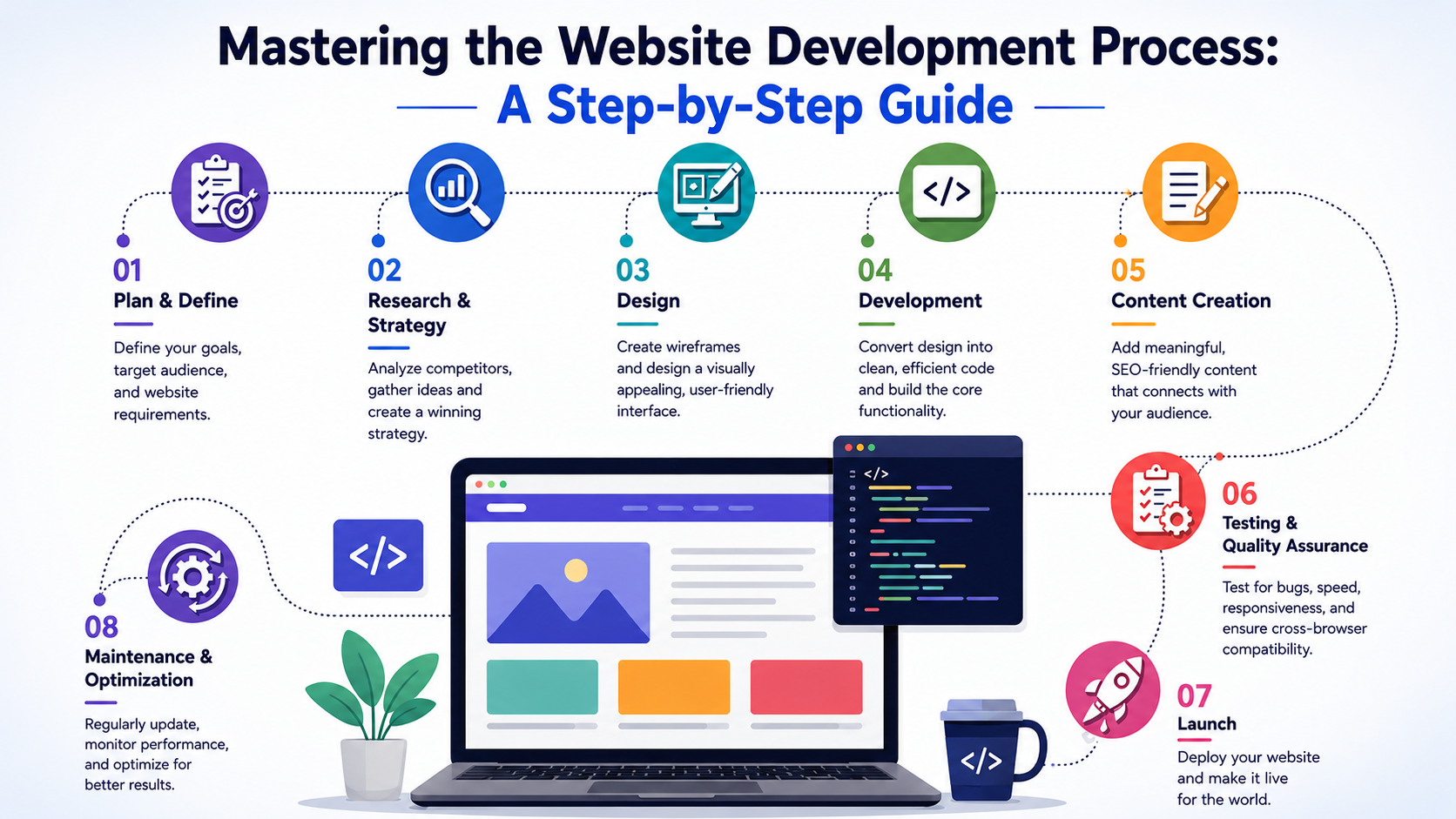
Launching a website can feel overwhelming—there are countless decisions to make, technologies to choose from, and strategies to implement. However, understanding the website development process from start to finish can turn a complex project into a structured and manageable journey. Whether you're a startup founder, small business owner, or enterprise looking to strengthen your digital presence, having a clear roadmap is essential for success. At Arrayno, we help businesses transform their ideas into high-performing, user-friendly, and scalable websites. From initial planning and strategy to development, testing, launch, and ongoing maintenance, our team follows a proven development methodology that ensures every website is built to achieve business goals and deliver exceptional user experiences. This comprehensive guide explores each stage of the website development process, helping you understand how professional websites are planned, designed, developed, optimized, and maintained in today's competitive digital landscape. 1. Discovery & Research Every successful website starts with research. Before creating designs or writing code, it's important to understand the business objectives, target audience, competitors, and market trends. At Arrayno, the discovery phase helps us gather critical information that shapes the project's direction and ensures the final product aligns with business goals. Key Activities During Discovery Identifying target audiences and user personas. Analyzing competitors and industry standards. Understanding customer pain points and expectations. Conducting keyword research for SEO opportunities. Defining measurable business objectives and KPIs. Research provides the foundation for strategic decision-making and helps create a website that effectively serves both users and business goals. 2. Planning & Strategy Once research is complete, the next step is creating a detailed plan. This stage acts as the blueprint for the entire website project. A well-defined strategy helps prevent scope creep, reduces development challenges, and ensures that all stakeholders share the same vision. Strategic Planning Includes Defining project goals and requirements. Creating a sitemap and website architecture. Planning navigation structure and user journeys. Identifying required features and functionalities. Establishing content requirements. Creating an SEO strategy. A strategic roadmap ensures smooth execution throughout the development process and helps keep projects on schedule and within budget. 3. UI/UX Design Design plays a crucial role in website success. Modern users expect websites that are visually appealing, intuitive, fast, and easy to navigate. At Arrayno, our design process focuses on creating engaging digital experiences that enhance usability while reflecting the brand's identity. Our Design Process Wireframing and layout planning. User interface (UI) design. User experience (UX) optimization. Interactive prototyping. Mobile-first design approach. Accessibility-focused design implementation. Good design is not only about aesthetics—it directly impacts user engagement, customer satisfaction, and conversion rates. 4. Website Development After design approval, the development phase begins. This is where visual concepts are transformed into fully functional websites. Arrayno utilizes modern technologies and industry best practices to develop secure, scalable, and high-performance websites. Our Development Services Custom Website Development Corporate Website Development eCommerce Website Development CMS Development Web Application Development Landing Page Development API Integrations Custom Portal Development Technologies We Work With HTML5 CSS3 JavaScript React.js Next.js Node.js PHP Laravel WordPress Shopify WooCommerce Our development team ensures that every website is optimized for performance, security, scalability, and future growth. 5. Testing & Quality Assurance Before launching a website, extensive testing is required to ensure everything functions properly. Testing helps identify bugs, performance bottlenecks, security vulnerabilities, and usability issues before users encounter them. Testing Areas Functional Testing Verifies that all website features work correctly. Responsive Testing Ensures compatibility across desktops, tablets, and smartphones. Browser Compatibility Testing Checks functionality across Chrome, Firefox, Safari, Edge, and other browsers. Performance Testing Measures loading speed, responsiveness, and server performance. Security Testing Identifies vulnerabilities and ensures user data protection. User Experience Testing Evaluates navigation, accessibility, and overall usability. At Arrayno, quality assurance is an integral part of every project to ensure a seamless user experience. 6. Website Launch Launching a website involves more than simply making it live. A successful launch requires thorough preparation and technical validation. Pre-Launch Checklist SEO Optimization Meta Tags Implementation XML Sitemap Creation SSL Installation Analytics Configuration Speed Optimization Mobile Optimization Security Checks Backup Configuration Our launch process minimizes downtime and ensures a smooth transition from development to production. 7. Search Engine Optimization (SEO) A visually appealing website is only valuable if users can find it. Arrayno integrates SEO best practices throughout the development process to improve search visibility and organic traffic. SEO Services Include Keyword Research Technical SEO On-Page Optimization Schema Markup Content Optimization URL Structure Optimization Site Speed Enhancement Mobile SEO Building SEO into the development process helps websites achieve better rankings and attract qualified traffic. 8. Website Maintenance & Support Website development doesn't end after launch. Continuous maintenance is essential to keep websites secure, fast, and competitive. Maintenance Services Regular Updates Security Monitoring Bug Fixes Performance Optimization Backup Management Content Updates Technical Support Feature Enhancements Routine maintenance helps ensure long-term reliability and protects websites from security threats and performance issues. Why Choose Arrayno for Website Development? Arrayno delivers customized web development solutions designed to help businesses achieve their digital goals. What Sets Us Apart Experienced Development Team Custom Website Solutions Mobile-First Development SEO-Friendly Architecture Fast Loading Websites Scalable Development Practices Transparent Communication Ongoing Technical Support Timely Project Delivery Whether you need a corporate website, eCommerce platform, business portal, or custom web application, Arrayno provides end-to-end website development services tailored to your unique requirements. Conclusion A successful website requires careful planning, strategic execution, professional design, robust development, rigorous testing, and continuous optimization. Understanding each phase of the website development process helps businesses make informed decisions and maximize the return on their digital investments. At Arrayno, we follow a structured approach that transforms ideas into powerful digital experiences. From discovery and planning to development, launch, and ongoing support, our team is committed to building websites that drive traffic, engage users, generate leads, and support long-term business growth. If you're ready to create a website that delivers real results, Arrayno is here to help you bring your vision to life.

Read Full Article
A Step-by-Step Comprehensive Guide for Mobile App Development in 2026
admin Jun 01, 2026

A Step-by-Step Comprehensive Guide for Mobile App Development in 2026

In today's mobile-first world, businesses need powerful, scalable, and user-friendly mobile applications to engage customers, streamline operations, and drive growth. As mobile technology continues to evolve in 2026, developing a successful app requires a strategic combination of innovative design, robust development practices, and cutting-edge technologies. Whether you are building an Android application, an iOS application, or a cross-platform solution using Flutter, understanding the complete development process is essential for delivering a high-performance digital product. At our company, we specialize in Android App Development, iOS App Development, and Flutter App Development, helping startups, enterprises, and growing businesses transform their ideas into feature-rich mobile applications. Our development approach focuses on creating secure, scalable, and visually appealing apps that provide seamless user experiences across multiple devices and platforms. The mobile app development journey begins with understanding business objectives, target audiences, and market requirements. Through detailed research and consultation, we identify the core functionality, user expectations, and competitive advantages that will shape the application's success. This strategic planning phase ensures that every feature aligns with business goals while delivering real value to end users. Once the project scope is defined, our UI/UX design team creates intuitive and engaging interfaces that enhance usability and user satisfaction. In 2026, users expect fast, responsive, and aesthetically pleasing applications. Therefore, we prioritize modern design principles, accessibility standards, and user-centric experiences that improve engagement and retention rates. For businesses targeting the Android ecosystem, we develop high-performance native Android applications optimized for a wide range of devices and screen sizes. Our Android development solutions focus on speed, reliability, security, and seamless integration with Google services to deliver exceptional user experiences. For organizations looking to reach Apple's premium user base, our iOS app development services provide robust and elegant applications tailored for iPhone and iPad users. We ensure compliance with Apple's latest guidelines while delivering smooth performance, advanced security features, and a refined user experience. For businesses seeking cost-effective and efficient cross-platform solutions, we leverage Flutter to build applications that run seamlessly on both Android and iOS from a single codebase. Flutter enables faster development, consistent UI design, reduced maintenance costs, and quicker time-to-market without compromising performance or user experience. During the development phase, we implement modern technologies such as Artificial Intelligence (AI), Machine Learning (ML), Cloud Integration, API Connectivity, Real-Time Data Synchronization, Push Notifications, Payment Gateway Integration, and Advanced Analytics. These technologies help businesses create smarter, more interactive, and future-ready mobile applications. Quality assurance is a critical component of our development process. Our testing team performs extensive functional testing, performance testing, security testing, compatibility testing, and user experience validation to ensure flawless operation across Android and iOS devices. By identifying and resolving issues before deployment, we guarantee a stable and reliable application for end users. Following successful testing, we manage the complete deployment process, including Google Play Store and Apple App Store submission, compliance verification, and launch optimization. Our support does not end after launch. We provide ongoing maintenance, feature enhancements, performance monitoring, security updates, and technical support to ensure long-term success. As mobile technologies continue to advance, businesses must adopt innovative solutions to remain competitive. This comprehensive guide outlines the complete process of Android, iOS, and Flutter app development in 2026, covering everything from concept validation and UI/UX design to development, testing, deployment, and post-launch support. By following a structured development approach and leveraging the latest technologies, businesses can build scalable, secure, and high-performing mobile applications that drive customer engagement, increase revenue, and support long-term digital growth.

Read Full Article
Ecommerce Website Development: A Comprehensive Guide to Building Your Online Store
admin May 29, 2026

Ecommerce Website Development: A Comprehensive Guide to Building Your Online Store

In today's digital world, having an ecommerce website is essential for businesses looking to expand their reach and increase sales. An ecommerce website allows customers to browse products, make purchases, and interact with your brand from anywhere in the world. Whether you're a startup, small business, or established retailer, a well-designed online store can help you grow your business significantly. This guide covers everything you need to know about ecommerce website development, from planning and design to features, technologies, and best practices. What is Ecommerce Website Development? Ecommerce website development is the process of creating an online platform where businesses can sell products or services. It involves designing the user interface, developing backend functionality, integrating payment gateways, managing inventory, and ensuring a secure shopping experience. A successful ecommerce website combines attractive design, seamless navigation, secure transactions, and optimized performance to provide customers with an excellent shopping experience. Benefits of an Ecommerce Website 1. Global Reach Unlike physical stores, ecommerce websites allow businesses to reach customers worldwide 24/7. 2. Increased Sales Opportunities Customers can shop anytime, resulting in more sales and revenue opportunities. 3. Lower Operating Costs Online stores often require fewer resources compared to traditional retail locations. 4. Better Customer Insights Analytics tools provide valuable information about customer behavior, helping businesses make informed decisions. 5. Improved Marketing Opportunities Businesses can leverage SEO, email marketing, social media, and paid advertising to attract customers. Essential Features of an Ecommerce Website User-Friendly Design A clean and intuitive interface helps customers easily find products and complete purchases. Product Management Store owners should be able to add, edit, and organize products efficiently. Advanced Search and Filters Customers should quickly locate products using categories, keywords, and filters. Shopping Cart Users need a convenient way to review and modify selected products before checkout. Secure Payment Gateway Integration with trusted payment providers ensures safe and secure transactions. Order Management Customers should be able to track orders, view purchase history, and receive updates. Mobile Responsiveness The website should work seamlessly across desktops, tablets, and smartphones. Customer Reviews and Ratings Reviews help build trust and influence purchasing decisions. Wishlist Functionality Allows customers to save products for future purchases. Inventory Management Real-time stock updates prevent overselling and improve operational efficiency. Steps to Develop an Ecommerce Website Step 1: Define Business Requirements Before development begins, determine: Target audience Product categories Business goals Budget Required features Step 2: Choose the Right Platform Popular ecommerce platforms include: Shopify WooCommerce Magento OpenCart Laravel-based custom solutions The choice depends on business size, customization needs, and budget. Step 3: Design the User Interface Focus on: Simple navigation Attractive product pages Fast loading speed Consistent branding Clear call-to-action buttons Step 4: Develop Core Functionality Implement: Product catalog User registration Shopping cart Checkout system Payment integration Order management Step 5: Implement Security Measures Security should include: SSL certificates Secure payment processing Data encryption Strong authentication Regular security updates Step 6: Test the Website Conduct testing for: Performance Mobile compatibility Security Payment processing User experience Step 7: Launch and Monitor After deployment: Monitor performance Track sales Fix issues quickly Continuously optimize the platform Technology Stack for Ecommerce Development Frontend Technologies HTML5 CSS3 JavaScript Bootstrap Vue.js React.js Backend Technologies PHP Laravel Node.js Python ASP.NET Database Options MySQL PostgreSQL MongoDB Payment Integrations Razorpay PayPal Stripe PhonePe Cashfree Ecommerce Website SEO Best Practices To improve search engine visibility: Optimize product titles and descriptions Use SEO-friendly URLs Add image alt tags Improve page speed Create quality content Implement structured data Ensure mobile responsiveness SEO helps attract organic traffic and increase conversions over time. Common Challenges in Ecommerce Development Security Threats Protecting customer information is critical. Cart Abandonment Simplify checkout processes to reduce abandoned carts. Website Performance Slow websites can negatively impact sales and user satisfaction. Inventory Management Keeping stock information accurate is essential for smooth operations. Competition Businesses must continually innovate and optimize to stay competitive. Future Trends in Ecommerce Artificial Intelligence AI-powered recommendations and chatbots enhance customer experiences. Voice Commerce Voice-enabled shopping is becoming increasingly popular. Augmented Reality Customers can visualize products before purchasing. Personalization Customized shopping experiences improve engagement and convcersions. Mobile Commerce Mobile shopping continues to dominate online retail growth.

Read Full Article